
Apple Watch
Live boats and today's schedule on your wrist, and your next boat right on your watch face.
The watch app and complications come with Find My Ferry Plus. Get it on your iPhone: open Find My Ferry, tap Settings, then Get Plus. Your watch finds it on its own with the same Apple Account. If it still asks for Plus, tap Restore purchases on the watch.
1. Get the app on your watch
The watch app comes with the iPhone app, and usually installs on its own. If it isn't on your watch:
- Open the Watch app on your iPhone.
- Scroll down to Available Apps.
- Tap Install next to Find My Ferry.
The watch gets ferry times over its own connection, so it keeps working when your iPhone isn't nearby.
2. Boats and Schedule
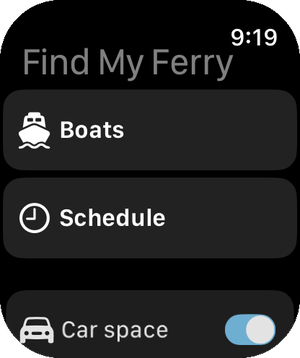
The app opens on Boats and Schedule, like the tabs in the iPhone app. Each keeps its own route, so you can watch one route's boats and another's schedule.
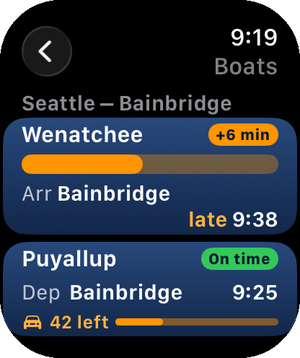
- Boats: tap a route to see its boats live, each with how far along its crossing it is and when it arrives or leaves.
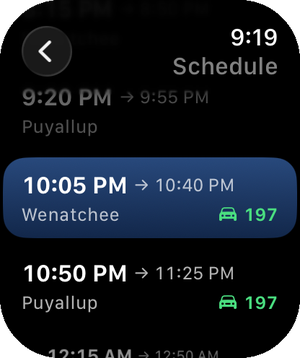
- Schedule: tap a route to see today's sailings, starting with the next one. Tap the arrows at the top to switch direction. At the end, Tomorrow shows tomorrow's sailings.
Your last route is at the top of each list, and the app opens where you left it.
Car space
Turn on Car space on the app's home to see the drive-up car spaces left on each departure, in Boats and in Schedule. It's separate from car mode on your iPhone.
3. Add complications to your watch face
Three complications, for different spots on the face:
- Ferry route, for the wide spots: the route's next two boats, both ways. It can also be in the Smart Stack.
- Ferry terminal, for the round, corner, and one-line spots: the next arrival or departure at one terminal. The ring fills as the boat gets closer.
- Ferry cars, for the same spots: how many drive-up car spaces are left on that terminal's next sailing. Put it next to Ferry terminal for the same sailing.
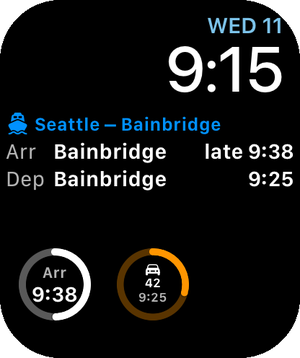
- On your watch, touch and hold the watch face, then tap Edit.
- Swipe left to the complications.
- Tap a spot, then scroll to Find My Ferry.
- Pick Ferry route, Ferry terminal, or Ferry cars, with your route or terminal, like "Seattle – Bainbridge" or "Seattle (Bainbridge)".
- Press the Digital Crown to save, then tap the face.
You can also do this on your iPhone: in the Watch app, tap your face under My Faces, then a spot under Complications.
Tap Ferry route to open that route's boats in the app. Tap Ferry terminal or Ferry cars to open the schedule from that terminal.
How current is it?
Your watch updates complications about every 10 minutes, and between updates they move on to the next boat by themselves. Opening the watch app updates them right away. Times marked "~" are from the schedule, until the boat's live times are known.
Still stuck? See Support or email support@findmyferry.com.